
We, the normal people, are subject to a giant experiment in the AI arms race – updated about another model almost every 2 or 3 months and party to all their triumphs and failures – witness to the coming of being of this great daemon – learning of terms like ‘hallucination’ in the context of AI, its sycophantism, fraudulence and mind-numbing brilliance.
With all this in mind, it is still not ‘if’ we use these tools, it’s ‘how’ and how to use them in the most effective means possible to avoid falling foul of their many flaws.
One such flaw is the erosion of meaning and direction in a themed chat, one which you may have built to discuss or solve an issue but, over time, has seen the vitality of the problem and its essence become distorted. You can find yourself reinforcing what has become a gluttonous and unwieldy chat, wasting your credits with the platform and ironically making the problem harder to solve and potentially adding to it. Take building a website: you start asking for strategy, then copy, then technical fixes, then loop back to strategy – the chat loses the thread and so do you. Essentially, one chat trying to plan and execute at the same time does neither well – so what’s the solution?
The two-chat architecture
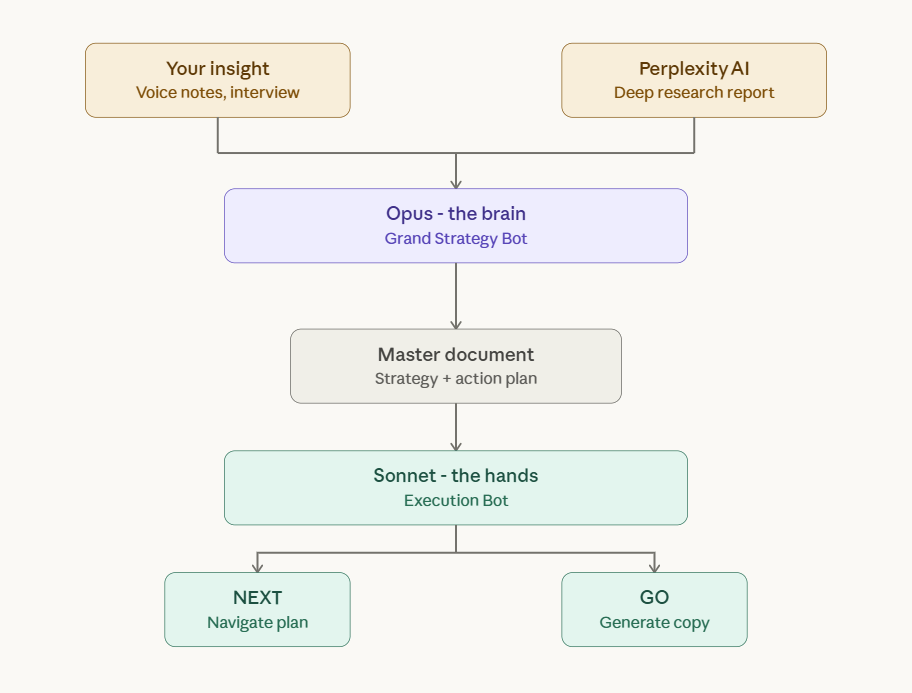
I’ll talk about my use of Claude to explore my own solution, but this method could apply broadly to any LLM. Claude has its Opus line of models, followed by Sonnet and finally Haiku. Opus is the most powerful, and is described as best used handling very complex tasks – the Sonnet model, I have found, is also very sophisticated and can handle tasks that most users might class as complex anyway – I have very little experience with Haiku as the models I’ve mentioned have been more than sufficient. The reason to use Opus for the strategy layer specifically is that the master document – which becomes the holy book for the entire project – benefits from the deepest possible reasoning at the point of creation. You only build it once, so it’s worth the extra firepower.
I’ll get straight to the point and explain the system that I’ve developed with these models that has effectively helped in everything from building this website to creating a shortlist of schools for my daughter in my local area.makes the system work.
Opus – The Brain
You can use the Opus model (currently 4.6) as the strategy chat, in this case the ‘brain’ – all the information that you feed in here – from your own experience, secondary sources and reports from other LLMs – all the contextual information about your project – can be fed in. Let’s call this chat the YOUR ISSUE GRAND STRATEGY BOT.

The master document
You should meet the model’s complexity with your own, allowing it to parse your information into a ‘master document’; a progressive summary of the issue complete with a proposed solution and action plan to achieve it. You could arrange this document or report in a preferred structure to summarise your project – I frequently produce them with a loose SOSTAC structure (Situation, Objectives, Strategy, Tactics, Actions, Control – a planning framework widely used in marketing). You can command this chat to produce a PDF document in summary of the issue which creates an artifact of it, fascinating to read as an item – as this remarkably capable system materialises your spurious inputs into a coherent report – and food for the next stage.
Let’s look at the components that constitute this master document.
Component 1: Perplexity AI report – AI research pillar
To go alongside your own explanations of the issue, you can produce a report externally by another LLM to feed into what the strategy chat will eventually create and you can do it like this:
- Build a research prompt: Write down or dictate to your Opus chat what the issue is in general terms, either dictate it as a voice message for a good 3 – 5 minutes or type the issue at some length from the top of your head into the chat. At the end of your summary include the command to create an extensive prompt for a Perplexity AI ‘deep research’ into the issue. The chat will answer your summary with its prompt that you can use to produce probably all of the external research you’ll need
- Export the prompt to another LLM: Take the prompt, and, in this case, drop it into Perplexity AI and activate its ‘deep research’ function to produce a report – it will draw from many sources to produce a thorough report of your issue, providing you with a deep situation analysis
- Establish this as a research pillar: Copy the report or download it as a DOC or PDF and drop the report into your Grand Strategy Bot – this, along with your own personal brief on the issue, will provide all the context the chat needs to produce the master document.
Component 2: AI Dictaphone: Hack into your brain, fast
Undoubtedly the most important input into the strategy produced by the Grand Strategy Bot is your own, honest insight into the issue. This is the soul of the response and the vast research you’ve done with your research prompt provides the background and analysis to complement this.
Straight to the heart of the issue
If you want to produce the best personal insight into your issue, you can try the following process:
- Set up your own interview: Talk at length into the chat about the issue for 5 minutes and end your summary with the command to produce an extensive list of interview questions that it will take up to an hour to complete
- Take your time to answer: The chat will produce lots of detailed questions specific to your issue – once you answer all of these, your strategy chat will have the best, most thorough personal account of the issue that needs solving as possible
- Speaking allows you to flow: To avoid being chained to your keyboard you can use a transcription app to answer the questions that have been prepared – just load the questions up on a doc in front of you and chat into the app – once you’ve finished you can download the transcription of your interview and upload this as answers into the Grand Strategy Bot. If you don’t want to use an app or you’re worried about paying for another subscription, you can speak directly into Claude or whatever platform you’re using and answer each question one by one, again, with the interview questions in front of you
Speaking out your issue, thinking on the spot – getting messy. This is where the real essence of the personal dimension comes into play. Typing edits your thinking before it gets to the page. After you’ve produced the hot pile of your responses, you can feed this into the Grand Strategy Bot – you’ve just given it the deepest, most thorough personal dimension of the issue possible.
This, combined with the depth of the research report conducted by AI, produces your master document – delivered by a top-notch model that thrives on complexity. This is your plan and now it’s time to program your execution bot (your ‘hands’) to hold your hand through it.
Sonnet – The Hands
The execution brief
On top of this master document, which will act as the first and final brief, you can prompt the Grand Strategy Bot to create a script with commands that activates a second executor chat – the Sonnet chat – that is set up to help you realise the objectives of the grand strategy.
Two commands can govern the workflow. “What next?” prompts the bot to check the current phase of the execution plan, identify the next uncompleted task, and deliver step-by-step instructions written for a non-technical user – no assumptions or jargon, just click this, type this, save etc.
“GO” triggers content generation: the bot produces complete, ready-to-paste copy for whatever had just been specified – a page, a blog post, a reformatted archive article – formatted with instructions specific to the issue. The two commands keep the work moving without requiring the user to manage the plan themselves – or, more accurately, allows the user to automate the structure of the plan and decide for and against in the process – providing elevated strategic control.
In summary, ‘Next’ handles navigation through the build sequence, ‘Go’ handles execution of each content task – in realisation of the strategy in the master document produced by the Grand Strategy Bot. When everything is in place the user will find themselves issuing these two commands as they build a project remarkably quickly, stopping along the way to make tweaks. The benefit of the two strategy and brief documents is that they help keep this chat trim, focused and unable to erode, because the model can refer back to all requirements that have been listed chronologically in the master document.
Some use cases from my life
Building matthew-byrne.com

I am the founder of the Spittoon Arts Collective, the largest English language literary arts collective in China. I founded the collective in 2015 and I ran it directly for 5 years and then consulted and managed it indirectly from the UK for the next 6 years.
Over the course of its existence we produced 264 articles on the collective’s public WeChat account. These articles comprise the entire history of the collective, in China at least – hundreds of cumulative windows into its experience. I was keen to archive all these articles for a western audience and to add security to the history of the collective. Saving these articles was a daunting task, I didn’t want to march through them systematically, posting 264 times – while also orchestrating the infrastructure of the website – my impatient nature wanted it done as quickly as possible so I implemented the ‘Next – Go’ system to do it.
I went through each article and saved the HTML page for each and zipped this as a ~2GB file that I split into sections and uploaded to ChatGPT (to take advantage of ChatGPT’s 512mb upload limit). I then instructed the AI to sort through the articles and categorise them in order of priority for relevancy from high to low (a lot of articles are just regular event advertisements, whereas some are longform articles about projects), ChatGPT created a categorised and exhaustive list of ranked articles – I then fed this into the Grand Strategy Bot, along with an interview with myself about my vision for the website.
I created the master document and brief for a Sonnet chat and implemented a ‘Next, Go’ system. Working in the evenings for a couple of hours, I have published a full website with 10+ pages and I have published 20+ articles as blogs in a week. I have no guilt over the quickness of this project – the hard work is already done, carrying heavy boxes of magazines up Chinese tenement blocks – spending my own cash to run a nationwide literary event sequence – among countless other projects. AI helped me to realise this – it removed the blocker of entry.
Since then I have conducted a deep SEO analysis of the site with Perplexity AI and it provided several invaluable suggestions as part of a report. I then fed this into the Grand Strategy Bot and allowed it to update the doc and the brief for reloading into the Sonnet chat. The Sonnet chat incorporated the suggestions into its workflow and made a decision on where these tasks sit in the hierarchy of its original tasks, all while maintaining the ‘Next’ and ‘Go’ prompt structure. This feedback loop is important and allows you to have total control as you introduce externals into the project.
Choosing a school for my daughter

The next example is very close to home – my daughter is 2 and a half and we’re interested in sending her to the best local school.
Instead of trawling through documents online and scouring OFSTED reports, I instructed Claude to write me a master prompt after voice-noting the crux of the issue, I then fed the prompt into Perplexity AI to create a deep research report on schools in the local area.
I created and transcribed an interview with my wife before combining this with the deep research report to create a master document. I instructed the platform to produce the information in the doc with an easy to read dashboard which contained all the priorities we personally had highlighted on top of all official scores.
In no time we had identified the local school that was a full 20% higher in SATs rates than its competitors – I instructed Claude to produce a PDF of the report and there we have it. What could have taken days took two hours.
We need to use these systems to unlock our potential
I had worked in China for years to develop the Spittoon Arts Collective – this system allowed me to showcase it through a website in days. We’re very invested in our daughter’s future – this system helped me to buttress it in hours.
Think about your own projects – how could this help you? How could it accelerate your progress?
What’s important is the feedback loop with the system. Your master document is its holy book. Have things changed? Drop a message into the Grand Strategy Bot to amend the master document and share it with your Sonnet chat. Your control will not waver and your acceleration will not cease.
 Matthew Byrne | Writer, Founder, Digital Marketer
Leave a comment